How WACHA works
How the classroom equipment connects, from the internet line to the learners’ desks, and why the cabinet stays locked.
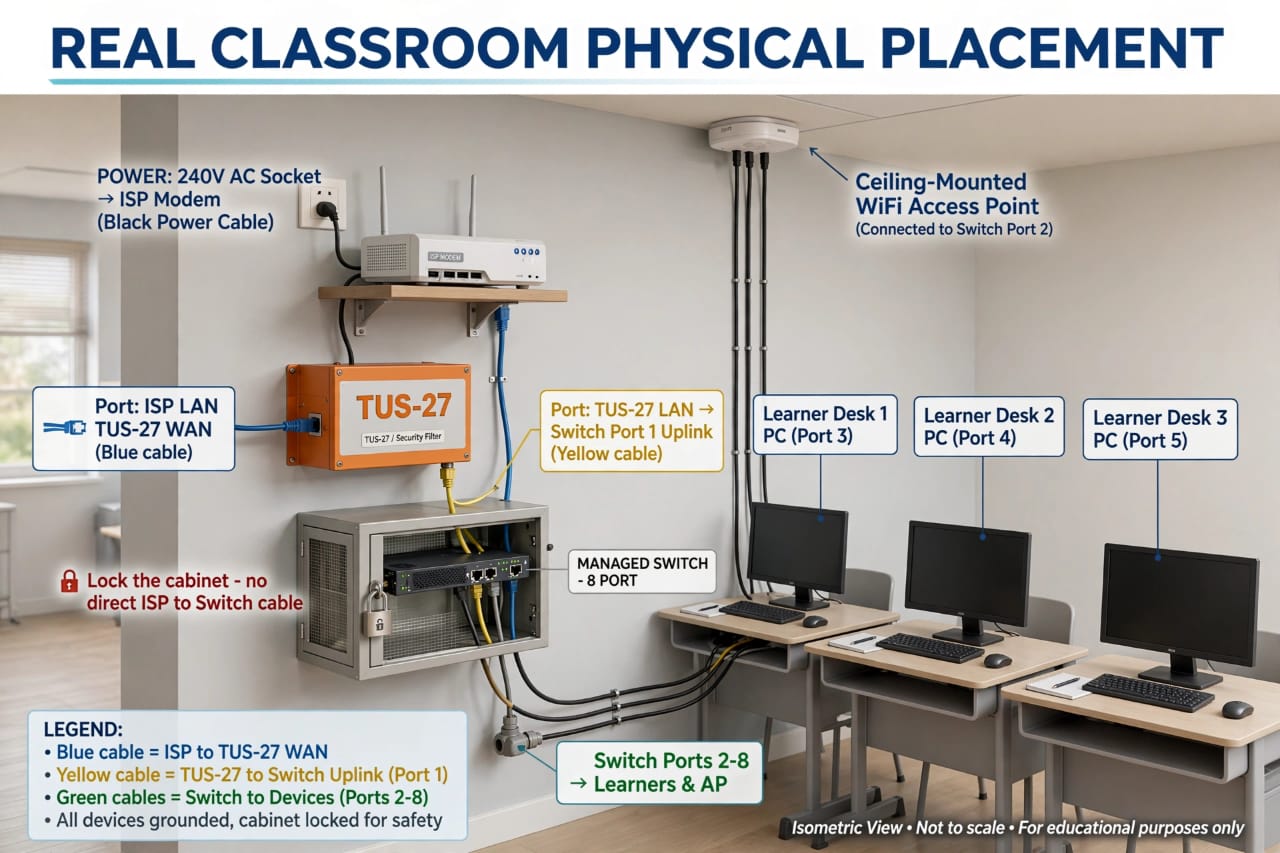
Five steps, from the wall socket to the desk.
-
Power the modem
The ISP modem sits on a shelf on the wall. It takes its power from the 240 V AC socket through the black power cable.
-
Internet into TUS-27
A blue cable runs from the modem’s LAN port to the WAN port of the TUS-27 box, labelled “TUS-27 / Security Filter”.
-
TUS-27 to the switch
A yellow cable runs from the TUS-27 LAN port to Port 1 (the uplink) of the 8-port managed switch.
-
Switch to the devices
Green cables carry the connection from Ports 2–8 to the learners’ devices and the WiFi access point on the ceiling.
-
Lock the cabinet
The switch sits in a wall cabinet that stays locked. There must be no direct cable from the ISP to the switch, so everything passes through TUS-27.
Cable colours.
Blue cableISP to the TUS-27 WAN port
Yellow cableTUS-27 to the switch uplink (Port 1)
Green cablesSwitch to the devices (Ports 2–8)
What plugs into which port.
| Port | Connects to |
|---|---|
| Port 1 | Uplink from the TUS-27 LAN port (yellow cable) |
| Port 2 | Ceiling-mounted WiFi access point |
| Port 3 | Learner desk 1 PC |
| Port 4 | Learner desk 2 PC |
| Port 5 | Learner desk 3 PC |
| Ports 6–8 | Remaining learner and access point ports (not drawn) |
Safety: all devices are grounded and the cabinet is locked.